
The most common mistake new ClickUp users make isn’t choosing the wrong view or forgetting to track time—it’s getting the hierarchy wrong from day one.
When your hierarchy is cluttered or inconsistent, search stops working, permissions become a nightmare, and your team spends more time figuring out where to put a task than actually doing the work.
ClickUp’s hierarchy is built on five core levels — Workspace ➔ Spaces ➔ Folders ➔ Lists ➔ Tasks (and Subtasks)
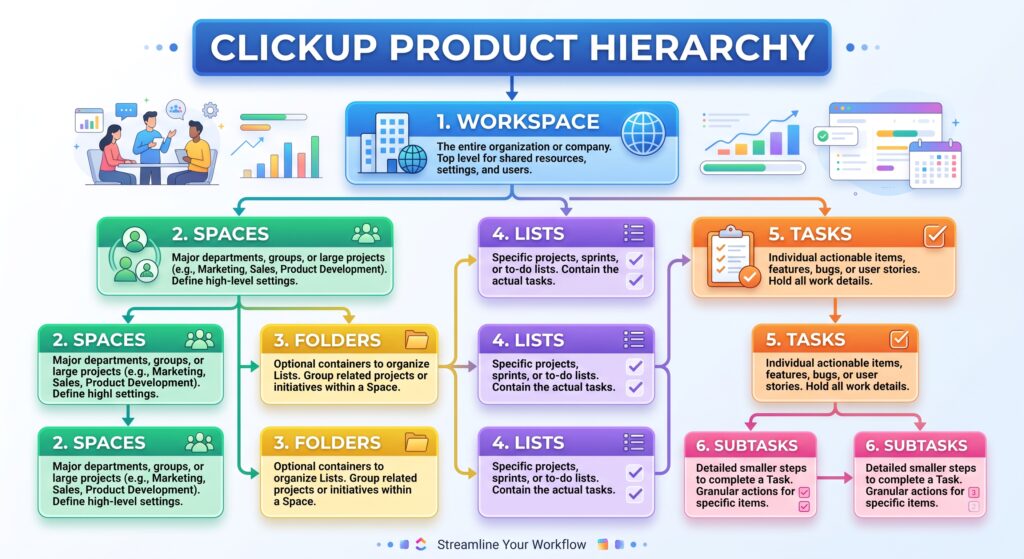
Understanding how to leverage each level is the secret to building an effortless, scalable system.
The 5 Levels of ClickUp Hierarchy
- Workspace (The Entire Company) Your Workspace represents your whole organization. 99% of businesses should only ever have one Workspace. Having multiple Workspaces creates silos because you cannot easily link or report across separate Workspaces.
- Spaces (Departments, High-Level Pillars, or Client Types) Spaces are the primary containers for organizing your work. They house custom settings, ClickApps, and permissions. Keep Spaces under 8–10 total. Too many Spaces forces team members to constantly collapse and expand sidebar menus.
- Folders (Projects, Clients, or Timeframes) — Folders live inside Spaces and group related Lists together. Note that Folders are optional—you don’t always need them.
- Lists (Actionable Work Units) Lists hold your actual tasks. This is where work happens
- Tasks & Subtasks (Actionable Items) Tasks represent specific to-dos with assignees, due dates, and statuses. Use subtasks for multi-step items within a main task.
3 Golden Rules for Structuring Your Hierarchy
- Don’t Over-Folder: If a Space only contains one Folder with one List, delete the Folder and keep the List at the Space level.
- Standardize Statuses at the Space Level: Keep task statuses consistent across a Space so dashboard reporting stays uniform.
- Use Views, Not New Lists, to Filter Work: Instead of creating a new List for “High Priority Tasks,” use a filtered View across existing Lists.
Ready to Optimize Your Workspace?
Building out your ClickUp hierarchy from scratch can feel overwhelming. Try ClickUp for Free (affiliate link) or Book a Workspace Audit with Heather to turn your chaotic setup into a streamlined system.
Affiliate Disclaimer: This post contains affiliate links, which means I may earn a small commission at no extra cost to you if you make a purchase through them. I only recommend products and services I genuinely use and trust to bring value to my readers.